
Peptide Calculator App
Monarca L.L.C-FZMedical
4.3129.00 Reviews
- Version
- 2.0.6
- Installs
- 10.00K
- Age Rating
- Everyone
Screenshots
Our Review of Peptide Calculator App
 Analysis by Appyee
I’d treat Peptide Calculator as a focused calculator for a specific kind of work, not as an all-purpose medical or laboratory companion. That distinction matters when a household shares a phone or tablet: the app may help with a calculation, but it should not be mistaken for a source of treatment advice or a substitute for checking a protocol. In my view, it makes the most sense when the person opening it already understands why they need a peptide calculation and how to verify the result.
A shared device needs a clear handoff
Picture a student using a family tablet to check a sequence, then handing it to someone else who uses the same device for everyday tasks. The practical risk is not that the calculator is inherently complicated; it is that a later user may not know whose sequence or result is on screen, or what assumptions went into it. I’d make a simple habit of clearing the screen or closing the app when finished, and I would avoid treating a displayed value as a household record. That kind of small handoff discipline is more useful than assuming a shared device automatically keeps each person’s work separate.
This is also a case where a personal notebook or an approved lab record can be better than relying on an app session. If you need to compare calculations later, record the sequence and the relevant conditions in the system you already trust. The app can help with a quick check; it should not become the only place a household or lab remembers an important result.
Keep calculation and interpretation separate
A peptide property estimate is not the same thing as a decision about how to prepare, store, or use a substance. I’d use the calculator to support a defined task, then check the result against a trusted reference or the method required for the work. This is especially important if someone is using peptide-related products outside a research setting: a numerical output can look authoritative while still being irrelevant to a personal health decision.
For a shared device, I would also agree on a simple boundary: whoever enters a sequence is responsible for checking it before acting on the output. A misplaced letter or an incomplete sequence can undermine an otherwise quick calculation. Reading the sequence back before accepting the result is an easy safeguard, especially when one person enters information and another person later sees the screen.
Who will get the most from it?
I can see this being useful for students learning how sequence changes affect calculated properties, or for researchers who want a convenient second check while working through peptide-related tasks. It may also suit a curious chemistry learner who wants to explore how different sequences produce different estimates, provided they understand that an estimate is not experimental confirmation. Someone who only needs occasional basic arithmetic will probably be better served by a general calculator, while someone needing a full research notebook or a validated workflow should use tools designed for those jobs.
Compared with doing every calculation by hand, a dedicated peptide calculator can reduce repetitive work and make it easier to inspect several properties in one place. Compared with a broad scientific calculator, its appeal is specialization rather than flexibility. That trade-off is worthwhile when peptide calculations are a regular part of your work; it is less compelling if you need chemistry functions across many unrelated subjects or need to preserve a detailed audit trail.
Before relying on any result, I’d check whether the sequence format and assumptions match the task in front of me. I would not assume that a convenient output covers every modification, unusual residue, or experimental condition. If the calculation is consequential, compare it with a trusted method and ask someone qualified to review it. That extra step is not a criticism of the app; it is a sensible boundary for any calculator used in science or health-adjacent work.
So, I’ve been playing around with this nifty little tool called the Peptide Calculator App, and let me tell you, it’s quite the game-changer for anyone knee-deep in the world of biochemistry or peptide synthesis. This app is available for both Android and iOS, and it’s designed to make your life a whole lot easier when dealing with peptides. Let’s dive into what makes this app tick.
What Does the Peptide Calculator App Do?
In a nutshell, the Peptide Calculator App is your personal assistant for calculating peptide properties. Whether you’re working in a lab or just a chemistry enthusiast, this app provides a comprehensive toolkit for calculating molecular weights, isoelectric points, and even extinction coefficients of peptides. Sounds like a lot of science jargon, right? Well, it’s actually pretty user-friendly.
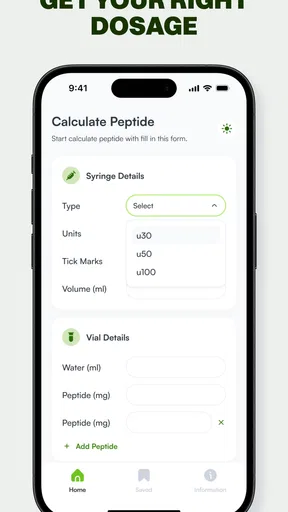
Once you open the app, you’re greeted with a clean, intuitive interface that doesn’t overwhelm you with too many options right off the bat. You can input your peptide sequence and voilà, the app starts crunching numbers faster than you can say "amino acids."
Features That Stand Out
One of the features I found particularly useful is the ability to switch between different units of measurement. Whether you’re more comfortable with Daltons or kilodaltons, the app has you covered. It’s those little conveniences that really add up when you’re in a hurry.
Another neat feature is the app’s ability to estimate the peptide’s solubility. If you’ve ever struggled with dissolving peptides (and let’s be honest, who hasn’t?), this feature is a lifesaver. It provides a pretty good prediction based on the peptide’s properties, saving you time and frustration.
Using the App: My Personal Experience
Let’s talk about the user experience. I’ve used a few similar tools in the past, and what sets this one apart is its simplicity. The developers have done an excellent job of keeping things straightforward, which is a relief. You don’t need a Ph.D. to navigate this app, and that’s saying something in the world of peptide calculations.
The app also comes with a handy reference section. If you’re ever in doubt about an abbreviation or a specific calculation method, you can quickly look it up without leaving the app. This is incredibly useful when you’re knee-deep in research and need quick answers.
Potential Improvements
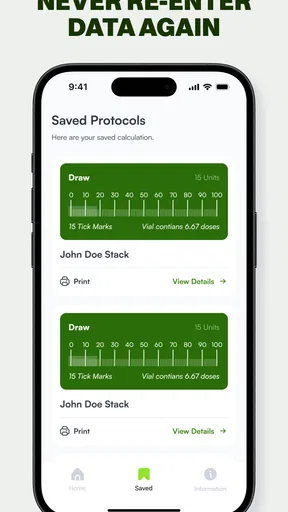
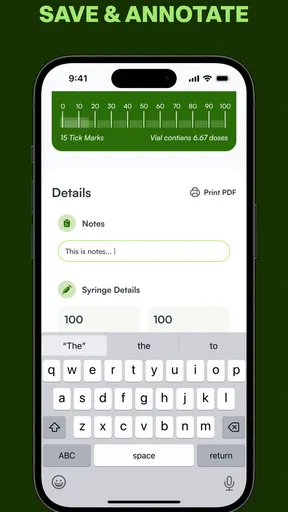
While the app is pretty solid, there’s always room for improvement, right? One thing I’d love to see in future updates is a feature that allows you to save your calculations. Right now, once you close the app, those numbers are gone. Having a history or save function would be a great addition for those of us who like to revisit our work.
Additionally, while the app does a great job with its current features, expanding its database to include more rare amino acids could be beneficial for advanced users. It’s not a deal-breaker, but it would definitely enhance the app’s utility.
Choosing it for your own routine
In practical terms, I’d reach for this app during a short calculation session rather than make it the center of an entire experiment. For example, a student preparing for a lab discussion could enter a sequence, review the calculated properties, and use the reference section to check terminology before talking through the result with an instructor. That is a sensible use: the app helps organize a quick question, while the course material and lab method remain the authority.
For a more experienced user, the unit switch is useful when a paper, protocol, or colleague presents a value in a different scale. I’d still check that I am comparing like with like before copying a number into notes. A quick conversion can prevent a transcription mistake, but it cannot resolve differences in assumptions or experimental conditions. My tip is to write down the unit beside every value as soon as you record it, rather than trusting yourself to remember which display setting you used.
The solubility estimate also calls for a little restraint. I’d use it as a prompt for planning and discussion, not as a guarantee that a particular sample will dissolve under real conditions. When the practical outcome matters, the actual material and the procedure matter too. This is one of the app’s useful-but-limited roles: it can help you think ahead, but it cannot replace observation or a validated procedure.
What to expect before installing
This is a free medical-category app from Monarca L.L.C-FZ, with optional in-app purchases priced from about five to ten dollars per item. It has an average rating of 4.5 from around 1,600 ratings, and it has been installed over 10,000 times. Those figures suggest that it has found an audience, but I would treat ratings as a rough signal rather than proof that its calculations match every user’s needs. The current version is 2.0.6, and the age rating is Everyone.
The minimum operating-system requirement is version 7.0, which is worth checking on an older device before planning to use it there. For a household, the Everyone rating is useful context for the app’s store classification, but it does not mean that peptide-related content is automatically appropriate for every child or that a young user can interpret scientific outputs safely. I’d keep the conversation age-appropriate and make sure a responsible adult or qualified teacher is involved when a young learner is doing more than exploring basic concepts.
Another reasonable question is whether the paid items are necessary. I’d begin with the free app and see whether its core calculator and reference material fit the task before considering any purchase. If you only need occasional checks, paying for an item may not add enough value to your routine. If a paid option is under consideration, read its description in the store first and make the decision with the person who will use it, rather than assuming every feature is essential.
There is also a useful distinction between personal convenience and coordinated work. If two people need to review the same calculation, I would not rely on one person’s open screen as a handoff system. Share the sequence and result through whatever record-keeping method your class, lab, or household already uses, and include the units and context. That reduces ambiguity without assuming the app provides accounts, shared histories, or collaboration tools.
Final Thoughts
All in all, the Peptide Calculator App is a fantastic tool for anyone involved in peptide synthesis or research. Its ease of use, coupled with a robust set of features, makes it a must-have for students and professionals alike. If you’re tired of endless manual calculations and want something that’s both reliable and efficient, give this app a try. You can download it from the App Store or Google Play and see for yourself.
So, there you have it! A handy little app that takes some of the stress out of peptide calculations. If you’re in the field, or just a curious science geek like me, you’ll find it pretty darn useful.
My household verdict
For a shared household device, I’d recommend it only when the intended user has a clear science-learning or research task and understands the limits of calculated estimates. I would not install it for a family member expecting general medical guidance, nor would I use it as a shared record of consequential work. Keep entries deliberate, verify important outputs, and pass along results with their units and context instead of relying on whoever last opened the app to explain them.
Its strongest fit is someone who regularly needs peptide-specific calculations and values a focused, approachable tool. Its weaker fit is someone who needs saved history, a comprehensive workspace, or broad scientific functions in one place. I like the convenience, but the missing save workflow I noticed changes how I’d use it: I’d treat each session as temporary and keep any result worth revisiting somewhere dependable. With that boundary in place, it can be a handy part of a routine without being asked to do more than a calculator should.
Verdict
Strengths of Peptide Calculator App
- User-friendly interface simplifies calculations.
- Comprehensive peptide database included.
- Supports multiple calculation modes.
- Provides accurate mass and concentration info.
- Offline access available for calculations.
Limitations of Peptide Calculator App
- Limited customization options for advanced users.
- Ads can be distracting during use.
- No integration with lab equipment.
- Occasional crashes on older devices.
- Lacks interactive tutorials for beginners.
Similar Picks in This Category
View All
WebMD: Symptom Checker
WebMD, LLC4.1

Microphone Amplifier
DOSA Apps4.2

Anatomy Learning - 3D Anatomy
3D Medical OU4.5

Period Tracker and Calendar
SimpleInnovation4.9

GoodRx: Prescription Coupons
GoodRx4.8

CVS Health
CVS Pharmacy4.5
Frequently Asked Questions
What is the primary function of the Peptide Calculator App?
The Peptide Calculator App is designed to assist researchers and scientists in calculating peptide properties, such as molecular weight, concentration, and molarity. It streamlines the process of preparing peptide solutions by providing accurate and quick calculations, making it an invaluable tool in both academic and industrial settings.
Is the Peptide Calculator App user-friendly for beginners?
Yes, the Peptide Calculator App is designed with an intuitive interface that caters to both beginners and experienced users. It offers step-by-step guidance, ensuring that even those new to peptide calculations can navigate the app easily and achieve accurate results without a steep learning curve.
Can the Peptide Calculator App handle complex peptide sequences?
Absolutely. The app supports a wide range of peptide sequences, including complex and modified ones. It allows users to input various amino acid sequences and modifications, ensuring comprehensive calculations. This makes it suitable for advanced research that involves intricate peptide structures.
Does the Peptide Calculator App require an internet connection?
No, one of the key advantages of the Peptide Calculator App is its ability to function offline. Users can perform all necessary calculations without an internet connection, making it convenient for use in laboratories or fieldwork where connectivity may be limited.
Are there any additional features that enhance the app’s usability?
Yes, the Peptide Calculator App includes features such as saving and exporting calculation results, customizable settings, and a comprehensive database of amino acids and modifications. These features enhance usability by allowing users to tailor their experience and efficiently manage their peptide calculations.
